OpenCode says Console breach may have exposed users' AI provider keys
The breach hit OpenCode's hosted Console; its team says local CLI keys weren't involved, and affected users are told to revoke keys at each provider.


OpenCode said Saturday (Oct. 17) that a breach linked to "a large scale distillation attack" impacted "1.4% of OpenCode Console users," and it told those users that AI provider keys saved in their workspaces may have been exposed.
The email said, "Third party provider keys (eg OpenAI, Anthropic) saved in your workspace may have been exposed," according to a screenshot posted to r/opencode and shared on X by security writer Matt Johansen. It cited "unauthorized access to a legacy system that we were in the process of decommissioning." The same text was posted on Hacker News.
"If you did not get an email you were not impacted, it was a subset of users who had external providers linked," OpenCode said in a post on X at 2:08 p.m. ET (11:08 a.m. PT; 1808 UTC). The company said it is "working with Anthropic, OpenAI, and Google to remediate."
We had a security breach last night related to a large scale distillation attack that impacted 1.4% of OpenCode Console users
— OpenCode (@opencode) October 17, 2026
We have notified them all this morning via email. If you did not get an email you were not impacted, it was a subset of users who had external providers…
OpenCode hasn't explained the "distillation" link; the term generally means training one model on another model's outputs, Noma Security said. Nor has OpenCode said how many people 1.4% represents, how the attacker got in, whether keys were encrypted or whether other data was accessed. "The incident is ongoing so we cannot share more details at this point," the post said.
OpenCode also hasn't said whether the incident is contained. Its status page lists no security incident; its only Console incident is "Console API elevated error rates" from 12:04 to 3:21 a.m. ET Sunday, with no cause given. This story is developing; EngineerPal last checked at 6:24 p.m. ET Sunday (Oct. 18).
Anthropic has acted on its side. "We've been working with OpenCode on yesterday's breach and have revoked Claude API keys we believe were affected," Lydia Hallie of Anthropic's Claude Code team said on X Saturday.
Some users reported charges before OpenCode's statement. Colin Parsons posted at 9:36 a.m. ET Saturday that his OpenAI key used in OpenCode "has been pounded for $281 of usage, starting at 2am eastern," plus $168 on Anthropic. EngineerPal hasn't verified those charges.
Dax Raad, who builds OpenCode at Anomaly, said on X that "we already contacted everyone, refunds are already underway." He told charged users to "email me [email protected] with info and we'll get you refunded." OpenCode hasn't published a refund policy or said whether it covers charges billed by the providers.
Am I affected?
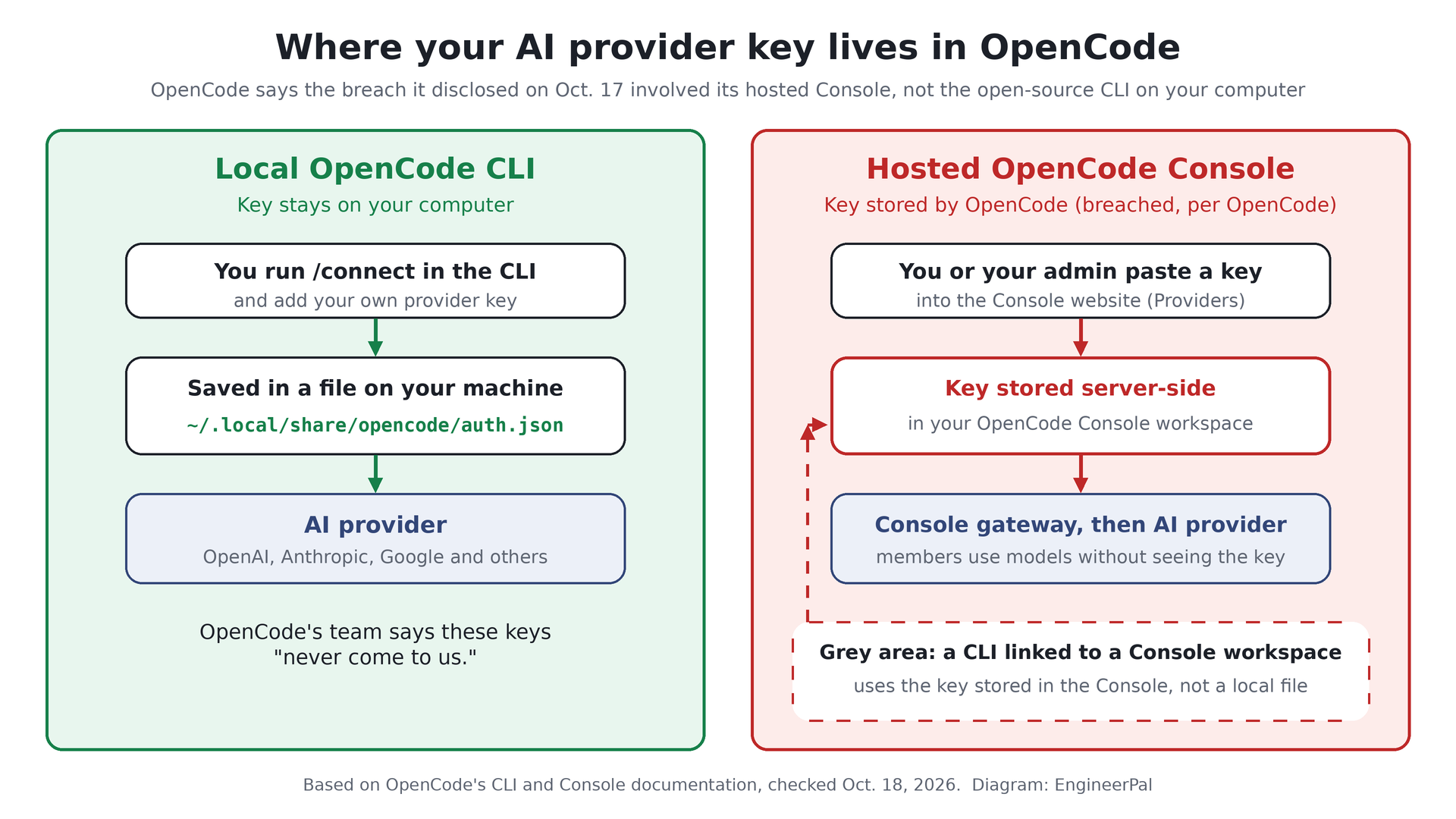
According to OpenCode, if you didn't get its email, you weren't impacted. The breach involves the hosted OpenCode Console, an optional web service where workspace owners and admins paste in their own provider keys. "Console stores the credential and serves each provider through its gateway," OpenCode's Console documentation said.
The open-source OpenCode CLI works differently. Keys added with its /connect command "are stored in ~/.local/share/opencode/auth.json" on your computer, according to OpenCode's docs. "Note this is the OpenCode Console, not OpenCode itself, those keys never come to us," Raad said on X.
The grey area is a CLI connected to a Console workspace. In that setup, the provider key lives in the Console, not on your machine, per OpenCode's Console docs and Noma. OpenCode hasn't said how its email test applies to members whose admin added the key, so ask whoever pasted keys into the Console website.
The Console also accepts Google Vertex AI service-account files and Azure, Bedrock, Cloudflare and Databricks secrets. OpenCode hasn't said whether those were exposed. If you aren't sure, rotating takes minutes, and Hallie said anyone who saved a key in OpenCode and wants "to be extra careful" should create a new one.
How to rotate your keys and check usage
Revoke each key at the provider, not just in OpenCode. "Changing a key in a gateway configuration is not the same as revoking the old key at the provider," Ron Harnik of Noma Security said. Save usage exports before asking anyone about charges.
- OpenAI: For a leaked key, OpenAI says to "rotate your key immediately" and delete the affected key on the API keys page. Create a replacement and update your apps, but don't leave the old key live meanwhile. Review usage for unexpected activity, keep the details and contact OpenAI Support through the Help Center chat.
- Anthropic: On the API keys page, open the "…" menu and choose Delete API Key, even if Anthropic already revoked it. Create a new key with an expiration, then filter the Usage page by key and check the Cost page. Anthropic's compromised-key guide covers support.
- Gemini API (AI Studio): Generate a new key in AI Studio, update your app, then disable or delete the old key in the Cloud console, per Google's checklist. Check Dashboard, then Usage, and consider a spend cap.
- Google Cloud and Vertex AI: Under APIs & Services, then Credentials, use Rotate key, update apps and delete the old key, per Google's docs. Replace any service-account key you gave the Console, check Billing Reports and set budgets and alerts.
- OpenCode Console: Replace or remove each credential on the Providers page, per OpenCode's docs. EngineerPal also suggests rotating other keys saved in an affected workspace, such as xAI or DeepSeek keys.
OpenCode said in its email that it "will follow up with any updates."